
Once the connectors are placed, you can review the connections and take a closer look at the locations where the update tool failed to place a valid connection.
In this sameple design, there are 2 locations where the update tool failed to place the correct connections.
The first one is at the back of the arch:
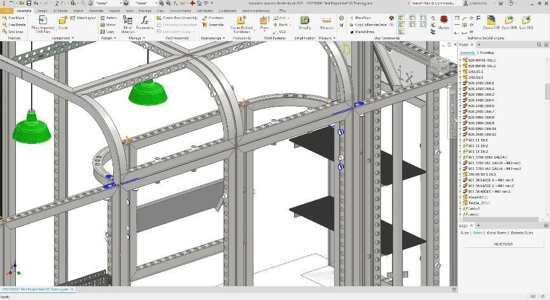
Here, the update tool placed 4 M8 pins too many. This is because it placed these based on the standard steel cover. In this case, these are not needed and can be deleted.
The tool also placed 2x T6 PINS at the top of the wall. We will replace this connection with a different one to connect the curved frame to the back wall.
First, begin by deleting the unnecessary connectors.
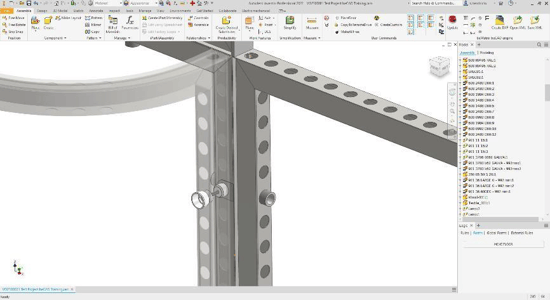
We will replace the T PINS with a T- CONNECTION BASE D30 with an M8 PIN that will be positioned over the already present double clamp in the back wall. Keep in mind that there are multiple ways to solve a problem, but look for a solution that will result in a strong and stable build.
At the front, the Update tool placed 3 red blocks to indicate that it failed to place a connection in this area. The reason the connection failed is because the glass frame is still a new product at the time of this project's creation, so it is not yet fully incorporated at this time.
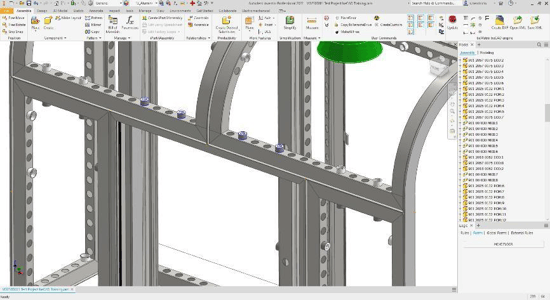
We will connect the two curved frames to the glass profile by using 4 TOOLLESS D30-SLOT CONNECTORS.